





Port iPad Apps to Mac with Xcode 11 Effortlessly

by Jun 25, 2019iOS

Printer Icon
f

Have you ever said: “this iPad App would be great on the Mac”?

Before Xcode 11, the only way to accomplish that was to have two separate code bases, one for iPad, and one for Mac. This came with its entire set of issues to maintain, and expand your app.

Now, you can bring your existing iPad App to the Mac, sharing the same project and source code delivering your app to an audience of over 100,000,000 Mac users.

First you will need to make sure your app is a good candidate. If your app’s essential features require iPad capabilities like gyroscope, accelerometer or rear camera, iOS frameworks like HealthKit or ARKit it might not be suited for the Mac.

To get started, all you need to do is select Mac in the deployment info section of your project (this will only work if you have support for iPad).
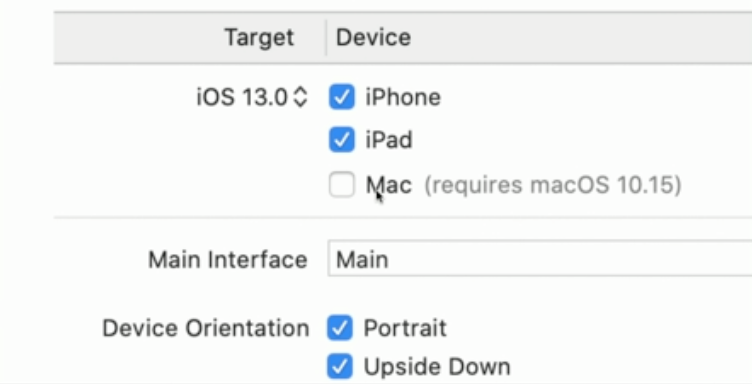
According to Apple’s Developer documentation :“The Mac version of your iPad app supports many system features found in macOS without requiring any effort from you…”. These features include:

  • A default menu bar for your app.
  • Support for trackpad, mouse, and keyboard input.
  • Support for window resizing and full-screen display.
  • Mac-style scroll bars.
  • Copy-and-paste support.
  • Drag-and-drop support.
  • Support for system Touch Bar controls.

In addition, many systems provide UI elements automatically convert from iOS to macOS for example, you get macOS-appropriate versions of the following:

  • Split view
  • File Browser
  • Activity view
  • Form sheet
  • Contextual actions

If you want lo learn more about this feature, check out the following links:

https://developer.apple.com/videos/play/wwdc2019/205/

https://developer.apple.com/design/human-interface-guidelines/ios/overview/ipad-apps-for-mac/

About Us

Krasamo is an award-winning mobile app development company. Our experience and predictable process will make your next project successful.

Learn More

5 Comments

  1. Avatar

    Not sure I’d call it effortless, but Xcode 11 does make porting iPad apps to Mac easier. Useful for any ios app development company looking to expand their reach on macOS.

    Reply
  2. Avatar

    I completely agree with the author! With Xcode 11, porting an iPad app to Mac has never been easier. I’ve worked on several projects that utilize iOS frameworks like ARKit, but since they’re not directly compatible with macOS, we had to refactor them from scratch before. However, with this new feature, you can now offer your ios app development services clients a seamless experience across both platforms! Thanks for sharing this helpful tutorial!

    Reply
  3. Avatar

    I completely agree with this post! Xcode 11’s porting feature is a total game-changer for iOS app development company looking to expand their reach on macOS. As someone who works in data science and has dabbled in iOS dev, it’s amazing to see how seamlessly UI elements convert from iOS to macOS. The drag-and-drop support is especially awesome! Thanks for sharing this great info!

    Reply
  4. Avatar

    Omg yay! 🎉 This is a total game-changer for iOS dev teams looking to expand their reach to Mac users without having to start from scratch! Xcode 11 has definitely made it easier to port iPad apps to the Mac, and I’m loving that we can now offer ios app development services with shared project codebases 💻. The features you mentioned are a huge time-saver – no need for separate code bases or complicated workarounds! 👍

    Reply
  5. Avatar

    I completely agree with the author that Xcode 11’s features make it a game-changer for cross-platform development. As an iOS software developer, I’ve seen firsthand how this tool streamlines the process of creating seamless user experiences across platforms. With its effortless porting capabilities and automated UI element conversions, developers can focus on building robust and intuitive apps without the overhead of manual coding. This is especially true for companies specializing in iOS app development company solutions.

    Reply

Submit a Comment

Your email address will not be published. Required fields are marked *

You need to sign in to LinkedIn to post a comment.

By signing in, you consent to the processing of your personal data in line with our Privacy Policy.

Related Blog Posts